

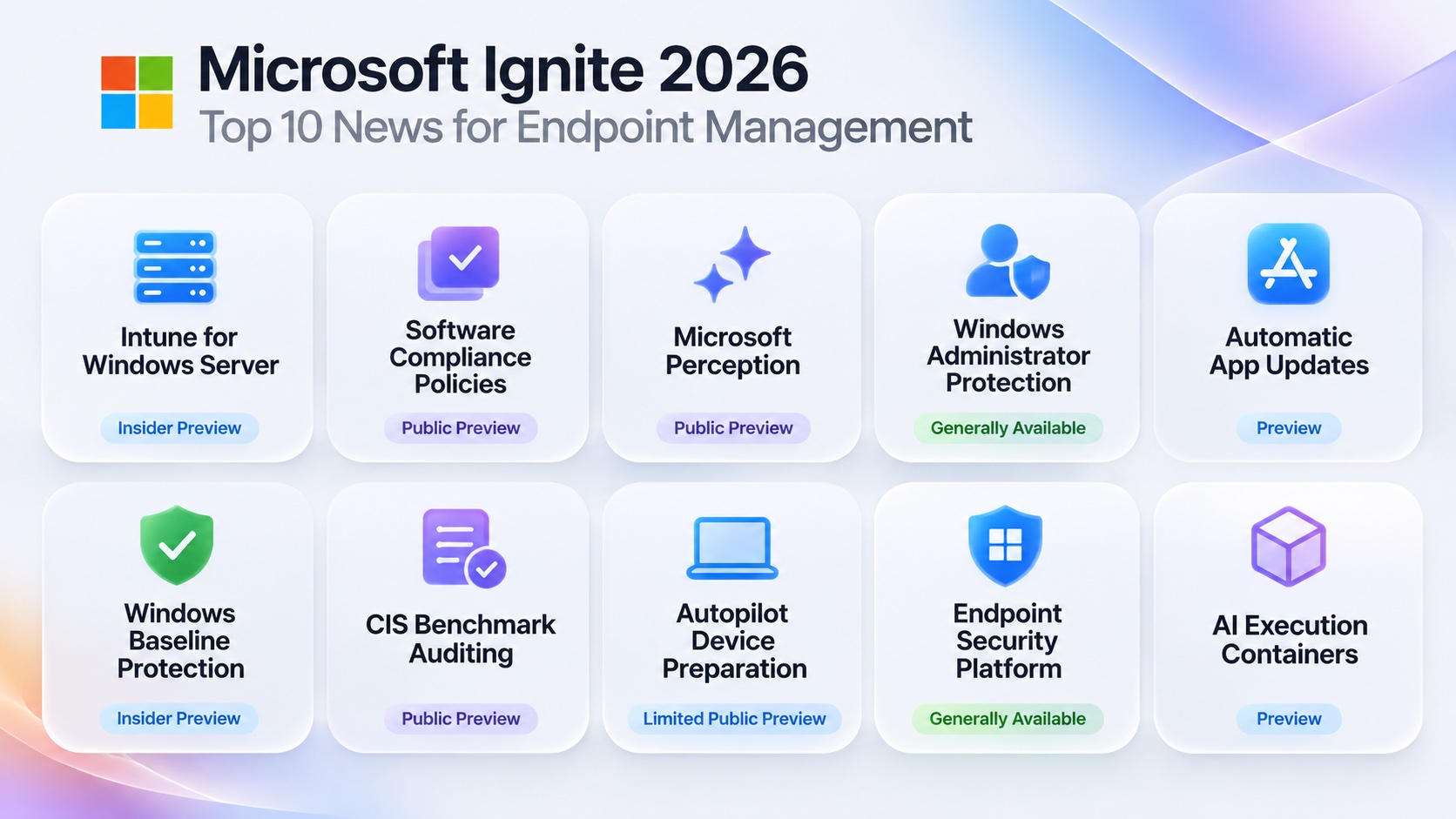
This year, there is a particularly strong focus on endpoint security, AI agents, automation, and simplifying everyday IT operations.
Rather than covering everything announced at Ignite, I’ve picked 10 announcements that I find particularly interesting from an endpoint management perspective.
Some features are already generally available, while others are still in preview.
1. Microsoft Intune Can Now Manage Windows Server
Availability: Insider Preview
This is probably one of the more interesting announcements for organizations already managing their Windows endpoints with Microsoft Intune.
Microsoft is extending Intune management capabilities to eligible Windows Server devices, bringing familiar cloud-management workflows beyond traditional Windows client devices.
This creates new opportunities for managing branch servers, administrative workstations running Windows Server, and other supported server scenarios.
It doesn’t mean Intune will replace every existing server management solution, but it’s an interesting development.
2. Software Compliance Policies in Microsoft Intune
Availability: Public Preview
Microsoft is introducing software compliance policies to help organizations identify restricted applications and unauthorized AI agents running on Windows devices.
Depending on the policy and detected software, a device can be marked noncompliant.
Combined with Microsoft Entra Conditional Access, this provides another way to enforce organizational requirements for applications running on managed endpoints.
I particularly like the idea of extending device compliance beyond traditional settings such as encryption, antivirus, and operating system versions.
3. Microsoft Perception Comes to Intune
Availability: Public Preview for onboarded customers
Microsoft Perception is bringing AI-powered investigation, reporting, and remediation capabilities into Microsoft Intune.
Instead of manually navigating multiple reports, administrators can use natural language to explore device information, investigate issues, and generate insights.
Microsoft is also introducing custom reporting and vulnerability remediation capabilities as part of this experience.
This is an area I’m particularly interested in following, especially how it could change troubleshooting and daily endpoint operations.
4. Windows Administrator Protection Is Generally Available
Availability: Generally Available
Windows Administrator Protection introduces a different approach to managing local administrator privileges.
Instead of running continuously with elevated privileges, local administrators operate with standard user privileges by default and elevate for approved administrative tasks.
This reduces unnecessary exposure from privileged sessions and strengthens the security model of Windows endpoints.
For organizations working toward least privilege, this is certainly worth investigating.
5. Automatic Updates for User-Installed Applications
Availability: Preview
Microsoft Intune Enterprise App Management is expanding its application update capabilities.
One interesting addition is support for automatically updating supported applications that users installed themselves, rather than only applications originally deployed by IT.
The experience introduces update controls and deadlines similar to those used with Windows Autopatch.
Keeping third-party applications updated remains a significant challenge for many organizations, so this could become a useful addition to application lifecycle management.
6. Windows Baseline Protection
Availability: Windows Insider Preview
Microsoft is introducing Windows Baseline Protection to bring several fundamental Windows security protections into a unified, verifiable security state.
This includes protections such as:
- Secure Boot
- Virtualization-based Security
- Memory Integrity
The idea is to provide a more consistent foundation for evaluating the security state of Windows devices.
I’m interested to see how this will complement the existing security baselines and compliance configurations we already deploy through Intune.
7. CIS Benchmark Auditing in Intune Advanced Analytics
Availability: Public Preview announced for November 2026
Microsoft is expanding security benchmark auditing in Intune Advanced Analytics.
Following the existing DISA STIG auditing capabilities, support for Center for Internet Security (CIS) benchmarks is being introduced.
This gives administrators another way to assess Windows devices against recognized security recommendations.
For organizations that already use CIS benchmarks as part of their endpoint security standards, this could reduce the need for additional reporting solutions.
8. Improvements to Windows Autopilot Device Preparation
Availability: Limited Public Preview
Microsoft is introducing a more transparent Windows Autopilot device preparation experience.
Improved visibility into the provisioning process should make it easier for administrators to understand device setup progress and investigate deployment issues.
Troubleshooting enrollment and application installation remains an important part of endpoint operations, so improvements here are always welcome.
9. BitLocker TPM + PIN for Every Managed User
Availability: Windows Insider Preview (Experimental channel)
Many organizations want a BitLocker startup PIN, so the drive on a lost or stolen device stays locked until the right person turns it on.
Until now, with BitLocker managed through Microsoft Intune, only users with administrator rights could set that PIN. Since most users are standard users, requiring TPM + PIN across the whole fleet wasn’t really practical.
That is changing. When the Intune policy allows silent enablement for standard users and requires TPM + PIN, Windows encrypts the device right away and then prompts the user at the desktop to set their startup PIN, whether they are an admin or a standard user.
The recovery password is backed up first, so IT can always recover the device, and compliance is reported back to Intune automatically.
Note that the BitLocker startup PIN is separate from the Windows Hello PIN: the startup PIN unlocks the drive before Windows starts, and Windows Hello signs the user in afterwards.
For organizations that have wanted pre-boot authentication but couldn’t roll it out to standard users, this removes one of the biggest blockers.
10. Managing AI Agents with Microsoft Execution Containers
Availability: Preview capabilities
With AI agents increasingly running locally on Windows devices, Microsoft is introducing new controls to help organizations manage their execution environments.
Microsoft Execution Containers provide isolated environments for supported AI agent workloads.
Together with new Intune management capabilities, organizations can define restrictions around what approved agents can access, including files and network resources.
This introduces another security consideration for endpoint teams: managing not just devices and applications, but also the agents executing on those devices.
Final Thoughts
Microsoft Ignite 2026 shows that endpoint management continues to expand beyond traditional device configuration and application deployment.
We are seeing more integration between endpoint management, security, vulnerability remediation, and AI-powered operations.
For me, the most interesting areas to follow are Microsoft Perception, Windows Server management through Intune, and the improvements to software compliance.
It will be interesting to see how these capabilities evolve and, more importantly, how they perform in real-world environments.
Which Microsoft Ignite 2026 announcement are you most excited about?